


Autel MaxiAP200
1.9432.00 Reviews
App Specs
- Version
- 1.64
- Updated On
- License
- Free
- Downloads
- 100,000+
- Developer
- autel2019
- Categories
- Auto & Vehicles
- Platform
- Android
Screenshots
 Analysis by AppCompare
I approach Autel MaxiAP200 as a tool for making a car’s electronic warnings easier to understand, not as a replacement for a trained mechanic. It is an automotive diagnostics app from autel2019, and its appeal is practical: pair a phone with a compatible Bluetooth OBDII dongle, scan the vehicle, and use the results to make a more informed next move. It is free to install, though some functions involve in-app purchases, so I would decide what I need before relying on any paid option.
Readability and navigation in a practical workflow
For me, the value of a diagnostic app depends not only on the amount of information it can show but also on whether I can make sense of it when a warning appears. The interface is presented as straightforward, and the app guides the connection process rather than assuming every driver already knows how to use a scan tool. That makes it more approachable than a bare code reader that displays an unfamiliar code and leaves the owner to search elsewhere.
The useful habit is to treat a scan as a sequence: connect with the car safely parked, read and record the results, then decide whether the issue needs professional attention. I would avoid clearing a code just to make a warning disappear. Keeping the original result gives you something concrete to describe to a mechanic, and it avoids confusing a temporary change with a genuine repair.
There is a trade-off in the app’s broad diagnostic ambition. More screens and system information can be helpful, but they can also feel like a lot if all you want is a quick explanation of one warning light. A simple handheld reader may be a better fit for someone who wants only basic engine-code checks and no phone-based workflow. I would choose this app when I expect to use the wider scan and live-data tools, rather than paying for or carrying capabilities I will never touch.
Diving into the Features
First off, the Autel MaxiAP200 is all about making car diagnostics more accessible. Whether you’re a car enthusiast or just someone who wants to keep an eye on their vehicle’s health, this app has got you covered. It pairs seamlessly with your smartphone, so you don’t need any bulky equipment. Just the app and a nifty little Bluetooth OBDII dongle, and you’re good to go.
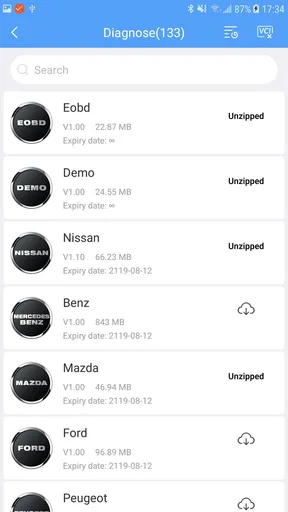
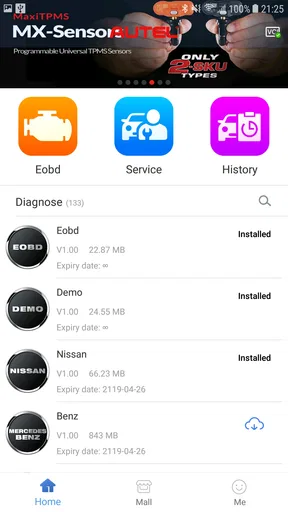
One of the things I love about this app is its user-friendliness. You don’t need to be a tech whiz or a car expert to navigate through its features. The interface is clean and intuitive, which means you can get started with scanning your car’s systems in no time. Plus, it supports a wide range of car models, so whether you’re driving a Toyota, Ford, or a BMW, you’re likely covered.
Motor and sensory considerations
A phone-based tool can reduce the need to read a small screen on a separate handheld scanner, because results can be reviewed on the device you already use. That may suit someone who finds juggling extra equipment awkward. Still, vehicle diagnostics involves a physical step: the dongle has to be plugged into the car’s OBDII port, and the phone has to connect to it. Anyone with limited reach, dexterity, or comfort bending near the dashboard may need another person to handle that part.
Worth Reading Before You Choose

EA SPORTS FC Mobile 26 Is a Bigger Football Game, but It Takes Time

Flipboard Shows What News Apps Must Do Beyond the Feed

Switching to Android Auto Means Rethinking Your Driving Routine

Google Calendar Makes a Crowded Week Easier to Manage

Ludo King Makes the Most of the Minutes Between Plans

Baby Panda World Brings Quick Play to Modern Phones, but Its Game Library Feels Busy
There is also a difference between having information available and finding it comfortable to use. Live readings can change while the engine is running, so a driver should not try to study the phone while moving. I would review results while parked, and, if a task involves observing data during a drive, have a passenger manage the phone. The app is most useful when it supports a calm decision, not when it becomes another distraction.
Real-time Data and Diagnostics
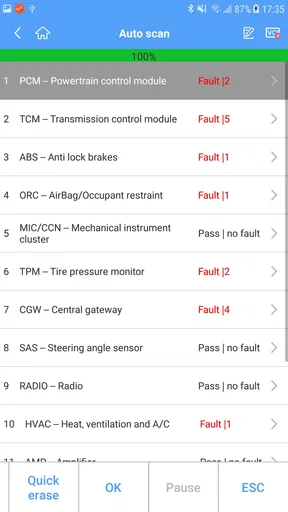
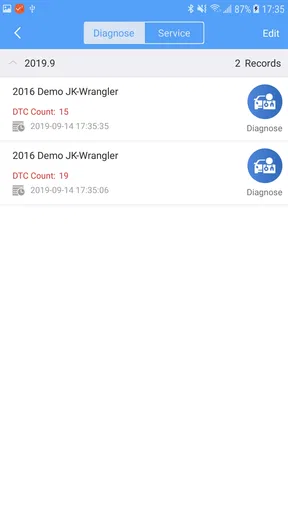
Now, let’s talk about the real crux of this app: the diagnostics. With the Autel MaxiAP200, you can perform a full system scan and get real-time data on your car’s performance. This includes reading and clearing diagnostic trouble codes (DTCs), which is a fancy way of saying you’ll know exactly what’s going on under the hood. No more cryptic dashboard lights!
The app provides detailed explanations for each code, which I find super helpful. It’s like having a car manual that actually speaks your language. If you’re a DIY kind of person, you’ll appreciate how it guides you through potential fixes. And if you’re not, at least you’ll have a better understanding of what to discuss with your mechanic.
I would treat those explanations as a starting point, not a diagnosis of the failed part. A trouble code identifies a condition the vehicle has detected; several underlying causes can produce similar symptoms. For example, a warning can point toward a system that needs investigation without proving that one specific component is faulty. Write down the code and any symptoms you notice, then use that combination to guide the conversation with a repair professional.
Situational access: from a warning light to a garage visit
A realistic use is a warning light appearing before a commute or a longer trip. Once safely parked, you can connect the dongle, run a scan, and keep the result for reference. If the warning suggests an urgent problem or the car behaves abnormally, the sensible next step is to stop using it and seek professional help rather than trying to solve everything through an app. If it seems less urgent, the scan can still help you explain the issue clearly when arranging service.
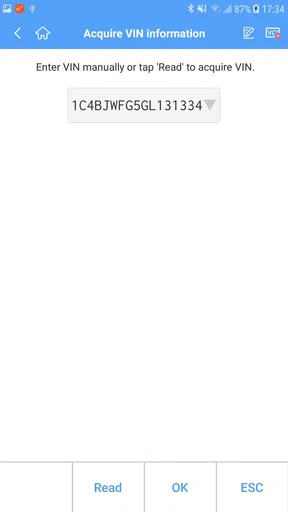
For a household with more than one vehicle, separate profiles can make it easier to keep each car’s diagnostic history distinct. I would check the selected vehicle before beginning a scan, especially when switching between family cars, so that I do not mistake one car’s results for another’s. That small pause is more useful than collecting a pile of unlabeled screenshots or notes.
The same approach can help when buying a used car, but I would not treat a clean scan as proof that a vehicle is sound. A scan is one piece of information, not a substitute for a road test, service records, or an independent inspection. Its best role is to prompt better questions: whether a warning is present, what the seller knows about it, and whether a mechanic should investigate before purchase.
Customization and Additional Tools
Another standout feature is the amount of customization available. You can create a profile for multiple vehicles, which is handy if you have more than one car or if you’re helping out friends and family. The app also allows for live data streaming, so you can monitor things like engine RPM, fuel consumption, and more as you drive. It’s like having a dashboard on steroids.
Additionally, there’s a maintenance function that reminds you of upcoming services. This is a lifesaver for someone like me who tends to forget oil changes and tire rotations. It’s the little things, right?
I would use maintenance reminders as prompts, while still checking the vehicle’s manual and service records for the correct schedule. A reminder is only helpful if the vehicle profile and service interval are kept accurate. For a car shared among several people, it is worth agreeing who records completed work; otherwise a reminder may arrive even after a service has already been done.
Connecting and Using the App
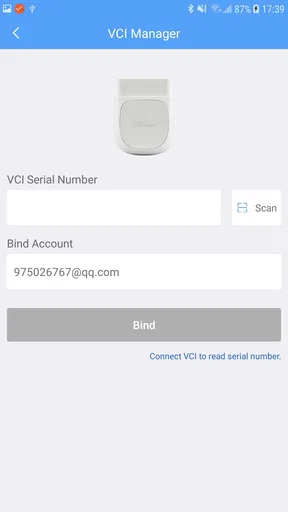
Setting up the app is pretty straightforward. Once you’ve got the OBDII dongle plugged into your car, you connect it to your phone via Bluetooth. The app does a great job of walking you through the setup process, so you won’t be left scratching your head. Just make sure your car’s ignition is on, and you’ll be scanning in no time.
One thing to note, though, is that while the app itself is free, some features might require in-app purchases. It’s worth checking out which features are essential for you before diving in. That being said, even the basic features provide a wealth of information that’s incredibly beneficial.
The app is rated for Everyone and has a 1.8 average from around 2.6 thousand ratings, with over 100 thousand installs. I would take that mixed user response seriously: it is a reason to set expectations carefully, not a verdict on how it will behave with every car or phone. Before spending on an additional function, I would confirm that the feature matters for my vehicle and intended task. The current version is 1.64, and it requires Android 7.0 or later; the listed in-app purchase range runs from $1.49 to $39.99 per item.
Remaining barriers and who should choose another tool
The main practical barrier is that the app is only one part of the setup. You need the compatible dongle as well as a phone, and using a Bluetooth connection adds a step that a self-contained reader avoids. Someone who dislikes pairing devices, has no suitable phone, or wants a tool that can be handed between drivers without setup may prefer a conventional scanner. Likewise, a person looking for a professional workshop instrument should not assume that a consumer app offers the same depth or workflow.
Compatibility deserves attention before a purchase. Broad vehicle support is useful, but it does not mean every function will be available on every model. I would identify the car’s make, model, and year, then check the specific diagnostic task I care about before paying for an add-on or assuming that a particular system can be accessed. A basic engine warning and a deeper system scan are not interchangeable needs.
There is a learning curve even when the menus are easy to follow. Reading a code is straightforward; deciding what it means for safety, repair cost, or whether it is reasonable to keep driving takes judgment. If you are uncomfortable interpreting results, the app can still help you prepare for a garage visit, but it should not pressure you into attempting repairs beyond your experience.
Inclusive verdict
Overall, this is most appealing to drivers who want more context than a warning lamp provides and are comfortable using a phone alongside a vehicle dongle. It can help a curious owner keep track of several cars, notice live readings, and arrive at a mechanic with better questions. It is less suitable for anyone who needs a fully hands-free experience, finds phone screens difficult to use, cannot comfortably reach the diagnostic port, or expects a scan to settle a complex mechanical problem by itself.
All in all, the Autel MaxiAP200 is a fantastic tool for anyone who wants to take control of their vehicle’s health. Whether you’re a car aficionado or just someone who likes to stay informed, this app offers a comprehensive range of diagnostics that’s hard to beat. It’s user-friendly, informative, and just plain cool to use.
So, if you’re tired of those mysterious dashboard lights or just want to keep tabs on your car’s performance, give the Autel MaxiAP200 a try. It might just change the way you think about car maintenance. Happy diagnosing!
Pros
- Easy Bluetooth connectivity with vehicles.
- User-friendly interface for quick navigation.
- Supports a wide range of vehicle models.
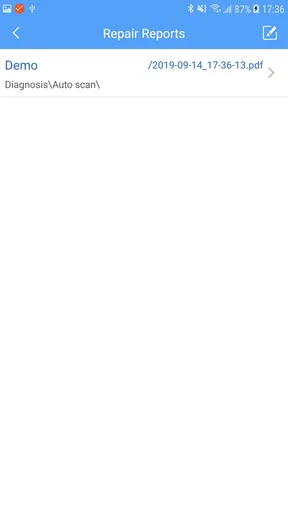
- Detailed diagnostic reports and codes.
- Affordable compared to other diagnostic tools.
Cons
- Limited advanced features for professionals.
- Requires in-app purchases for full access.
- Compatibility issues with some older vehicles.
- Occasional connection drops reported.
- Limited customer support and updates.
FAQs for Autel MaxiAP200
What is the Autel MaxiAP200 app used for?
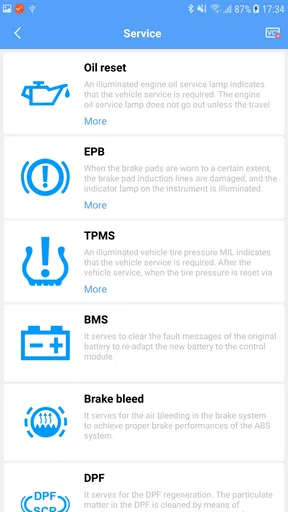
The Autel MaxiAP200 app is a versatile diagnostic tool designed to provide comprehensive vehicle diagnostics. Users can connect their smartphones to their vehicles via Bluetooth, allowing them to perform various functions such as reading and clearing diagnostic trouble codes, viewing live data, and performing special functions like oil reset and EPB service.
Is the Autel MaxiAP200 app compatible with my vehicle?
The Autel MaxiAP200 app supports a wide range of vehicle makes and models, but compatibility can vary. It's essential to check the compatibility list provided by Autel before purchasing. The app typically supports most OBDII-compliant vehicles, but certain features might be limited depending on the make and model.
How do I connect the Autel MaxiAP200 app to my vehicle?
To connect the Autel MaxiAP200 app, first plug the MaxiAP200 device into your vehicle’s OBDII port. Then, download the app on your smartphone. Open the app, enable Bluetooth, and pair it with the device. Once connected, you can begin running diagnostics and accessing vehicle data directly from your phone.
What features does the Autel MaxiAP200 app offer?
The Autel MaxiAP200 app offers a variety of features including full OBDII functions, advanced diagnostics for specific systems, and special services like oil reset, battery management, and DPF regeneration. Users can also view live data streams and perform component tests, making it a powerful tool for both professional and DIY mechanics.
Does the Autel MaxiAP200 app require any subscription fees?
The Autel MaxiAP200 app requires an initial purchase of the MaxiAP200 device, which includes access to one vehicle make for a year. Additional vehicle makes or extended access may require subscription fees. It's advisable to review the pricing structure on the official website to understand any ongoing costs.


